Think Outside the Pod: Kubernetes Access, From Cluster to Cloud
By Jean-Yves PASQUIER on
PanIAM answers one question across your cloud: who can really access what, directly or through a chain of steps. Until today, that graph stopped at the edge of your Kubernetes clusters. A cluster was a single resource, and everything running inside it was out of view.
Today, we’re bringing Kubernetes into PanIAM. Your clusters, their workloads and their identities now sit in the same access graph as the rest of your cloud.
Kubernetes, and Why Securing It Is Hard
Kubernetes runs your containers. You declare what should run (a Deployment, a CronJob, a DaemonSet), and the cluster keeps it running: it creates pods, places them on a fleet of machines called nodes, and replaces them when they fail.
That convenience comes with a security model of its own, and it is not a simple one:
- A second identity system. Kubernetes has its own identities (ServiceAccounts), its own permissions (Roles and ClusterRoles) and its own grants (RoleBindings). None of them appear in your cloud IAM.
- Permissions with side effects. RBAC rules read like a list of verbs on resources, but their consequences do not. An identity allowed to create pods in a namespace can run a pod as any ServiceAccount of that namespace, and so holds everything those ServiceAccounts can do.
- Workloads move. The scheduler decides where each pod runs from labels, affinities and taints. Which pods share a node, and so which credentials sit side by side, changes over time.
- Permissive defaults. ServiceAccount tokens are mounted into pods unless you opt out, and a namespace enforces no Pod Security level unless you set one.
Each of these is manageable on its own. Together, they make a simple question hard to answer: who can do what in this cluster?
Managed Kubernetes: Two Identity Systems, Joined Together
Most teams don’t run Kubernetes on their own hardware. They use a managed service from their cloud provider, such as Amazon Elastic Kubernetes Service (EKS), Azure Kubernetes Service (AKS) or Google Kubernetes Engine (GKE). The provider runs the control plane; you run the workloads.
A managed cluster is also wired into the cloud’s identity system, in both directions:
- Cloud identities come in. Your cloud users and roles get access to the cluster: through access entries on EKS, through Microsoft Entra ID on AKS.
- Workloads reach out. Pods receive cloud identities to call cloud services: IAM Roles for Service Accounts (IRSA) and Pod Identity on EKS, Workload Identity on AKS and GKE.
- Nodes have their own identity. Each node is a virtual machine with its own cloud role and, depending on its metadata settings, the pods it runs can obtain that role too.
So every managed cluster raises questions that belong to neither world alone. Can this CI role run code in production pods? Which pods can read this bucket? If a pod reaches its node, what does it hold then? Cloud posture tools look at the cloud side, Kubernetes scanners look at the cluster side, and the access paths that cross from one to the other fall between them.
PanIAM now covers both sides, as well as the boundary between them.
What PanIAM Does Today
PanIAM reads your cloud-managed Kubernetes clusters through a read-only grant, next to the cloud resources it already collects. It computes effective access on both sides of the boundary and puts the result in one graph. Here are three of the questions it now answers.
Who Can Act Inside Your Clusters
In a managed cluster, cloud identities enter through a mapping the provider
controls. On EKS, an access entry maps an IAM user or role to a Kubernetes
identity, and access policies (such as AmazonEKSEditPolicy or
AmazonEKSClusterAdminPolicy) grant it permissions, across the cluster or in
chosen namespaces. Inside the cluster,
ServiceAccounts receive their permissions from RBAC bindings.
PanIAM resolves both, and turns them into what each identity can actually do:
- Run code in a workload, by opening a shell in a pod or rewriting what a Deployment runs.
- Act as a ServiceAccount, by creating a pod or a controller that runs as it, or through impersonation and token requests.
- Become admin of a namespace or of the cluster, through the
escalateandbindverbs or an admission webhook.
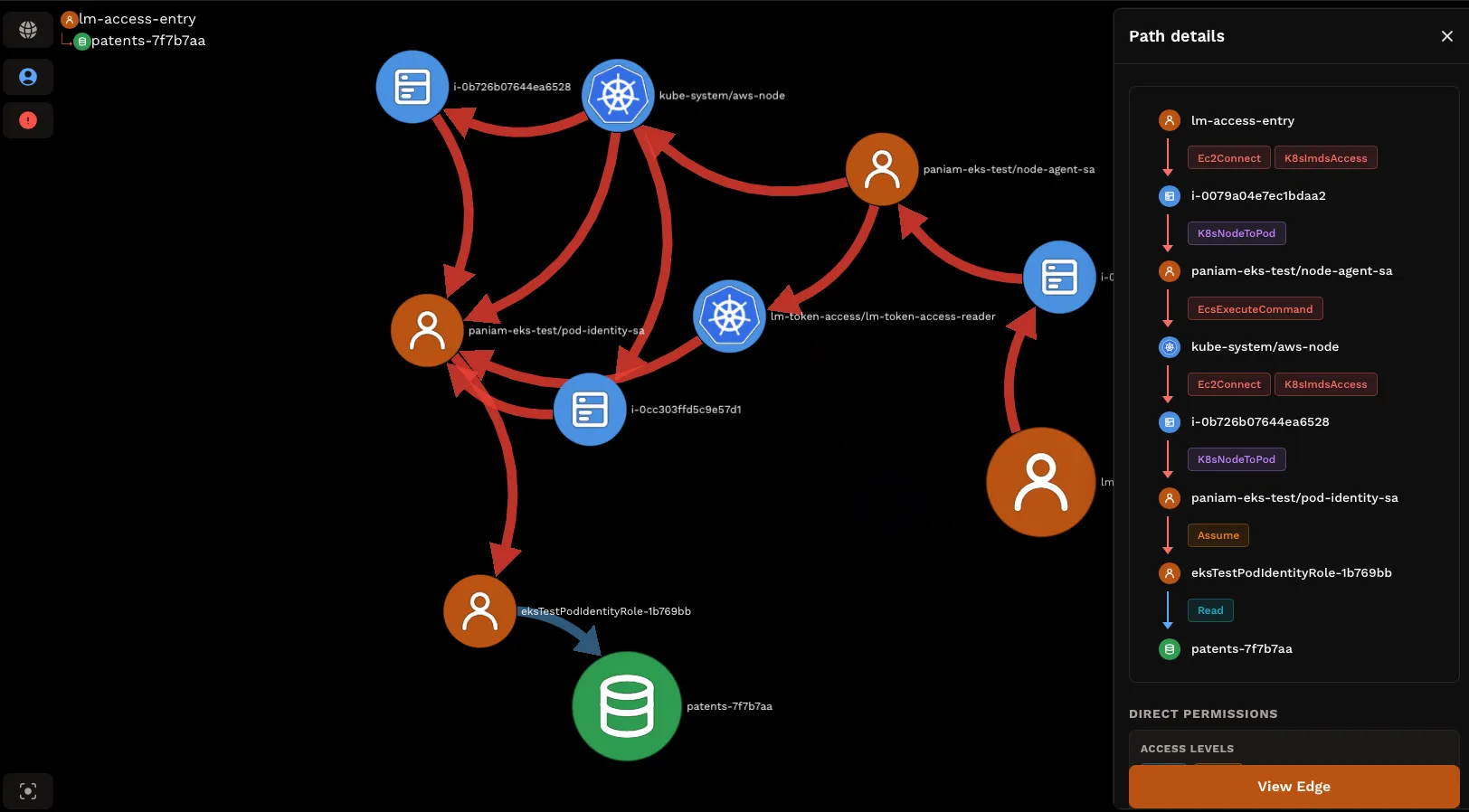
Take a CI role given AmazonEKSEditPolicy on the payments namespace so it
can deploy releases. It can also create a pod in payments that runs as any
ServiceAccount there, and so holds what each of them holds, in the cluster and
in your cloud. PanIAM shows that path and names the access entry that grants
it.
What Your Workloads Can Reach in Your Cloud
The other direction matters just as much. A pod runs as a ServiceAccount, and a ServiceAccount can obtain a cloud identity in three ways:
- Token federation, where the pod exchanges its ServiceAccount token for a cloud role whose trust accepts it (IAM Roles for Service Accounts on EKS, Workload Identity on AKS and GKE);
- Identity association, where the cluster links the ServiceAccount to a role and delivers that role’s credentials to its pods (EKS Pod Identity);
- The node’s own identity, read from the metadata service when the node’s settings let pods reach it.
PanIAM links each workload to the roles it can obtain, then to everything those roles can access. For token federation, it doesn’t stop at the role named in the ServiceAccount’s annotation. It checks which trust policies accept the workload’s token, because the annotation doesn’t limit which roles a token can be exchanged for. A trust policy with a loose condition shows up for what it is.
PanIAM also knows which workloads the internet can reach, through a NodePort, a host port or a load balancer in front of them. Those workloads become entry points in the graph, like any public virtual machine.
Privileged Pods: When a Pod Holds Its Node
Some pods are not contained by their container. A privileged pod, a pod given
capabilities such as SYS_ADMIN, or a pod that mounts a sensitive host path
(/etc, the container runtime socket) can run code on its node. From there it
holds what the node holds: the node’s cloud role, and the ServiceAccount
tokens of the other pods scheduled there. Some workloads need this level of
access, like node agents and network plugins. The questions are which ones, and
who can create more.
To answer them, PanIAM computes where each workload can run. It matches node selectors, affinities and tolerations against your node groups, then adds where pods run today and where DaemonSets spread. A privileged pod is linked to every node it can land on, and each node to every pod that can share it.
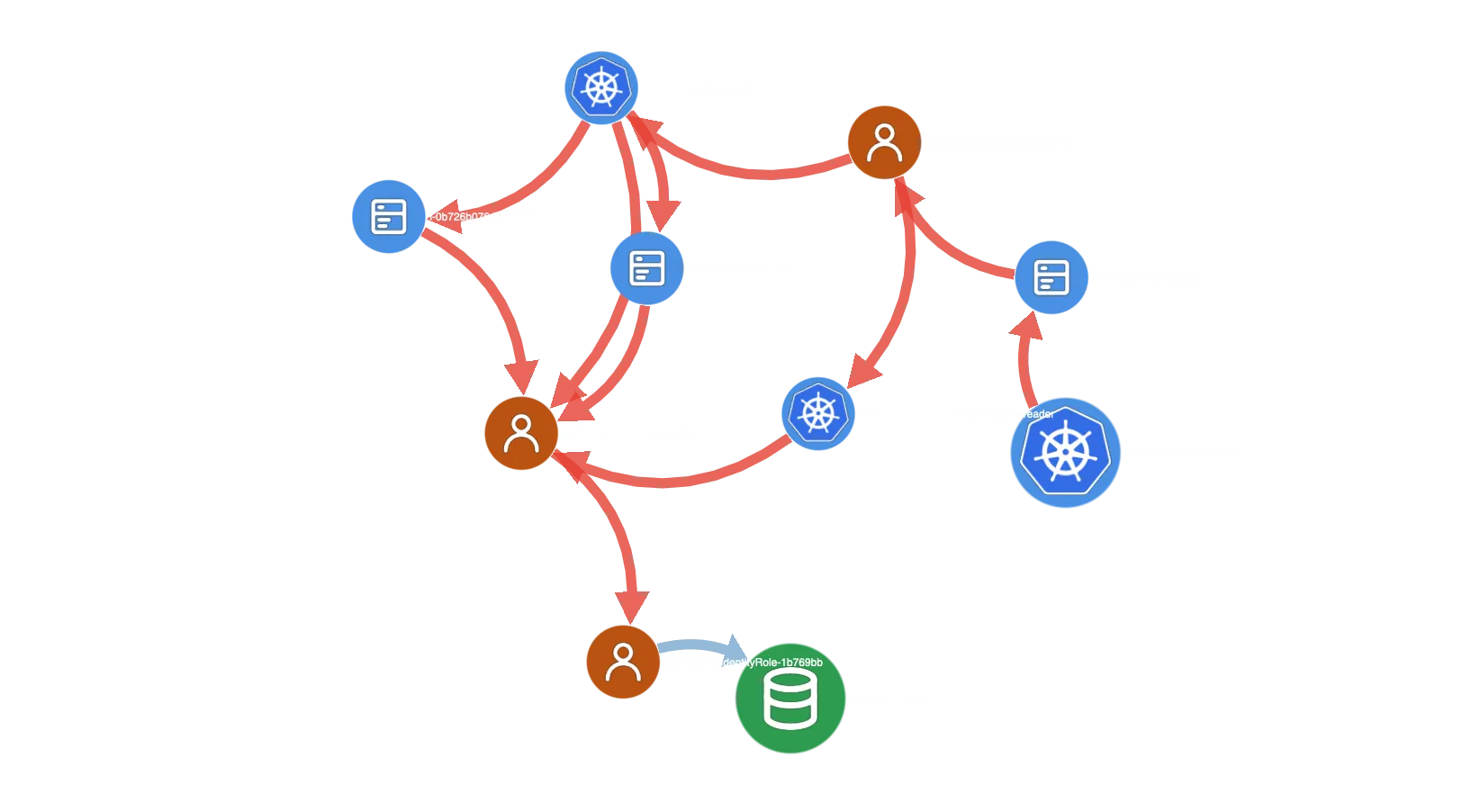
The same reasoning covers pods that don’t exist yet. Whoever can create pods in a namespace can create a privileged one, unless the namespace enforces a Pod Security level that refuses it. Put together, a chain like this one becomes visible:
- A CI role has an access entry that lets it create pods in a namespace.
- That namespace enforces no Pod Security level, so a privileged pod is admitted.
- The pod runs on a node and holds the node’s cloud role.
- That role can read the bucket holding your production database backups.
The result is not inside the cluster at all. A CI role, meant to deploy releases into one namespace, can read your production database backups: a sensitive resource in your cloud that no policy grants it directly, and that nobody knew it could reach. Each step looks harmless in its own tool. The path only appears when the cloud and the cluster sit in one graph, and that graph is what PanIAM builds.
Vulnerabilities and Remediation, for Kubernetes Too
Access is half of the picture. PanIAM also reads the vulnerability scans of the container images your workloads run (from Amazon ECR today) and turns them into a risk for each workload, adjusted for how the internet reaches it. A vulnerable workload behind a public load balancer, running as a ServiceAccount that obtains a powerful role, now ranks where it should.
And because Kubernetes steps are part of the graph, they are part of the remediation engine too. When the best fix sits in the cluster, PanIAM names the object to change: the RBAC binding or access entry that grants too much, the node group launch template whose metadata settings let pods reach the node’s role, the workload that asks for host access it doesn’t need. Each fix comes with the risk it removes, so your team can weigh a Kubernetes change against a cloud policy change on the same scale.
Your Clusters and Your Cloud, in One Graph
Kubernetes is where many teams run their most important services. It deserves the same clarity as the rest of your cloud: not one list of findings per tool, but the access paths that actually exist, and the fixes that close them.
If you’re already using PanIAM, contact us to turn on the analysis of your Kubernetes clusters. If not, get secure now and see your clusters and your cloud in one graph.
Related posts



Stay Tuned
We write about attack paths, what's worth fixing first, and the new risks AI agents bring to your cloud, every two weeks.
Subscribe Now